Việc kết nối đến PostgeSQL từ PHP, Laravel, NodeJS đều sẽ có một quy trình khác nhau! Hãy cùng tìm hiểu ở bài viết này.
Kết nối đến PostgreSQL từ PHP
- Cấu hình extention trong php
Mở php.ini rồi bỏ dấu ; ở trước 2 thư viện pdo_pgsql và pgsql. Mục đích là để 2 thư viện này được nạp cùng với php để bạn dùng nó kết nối qua server POSTgreSQL.
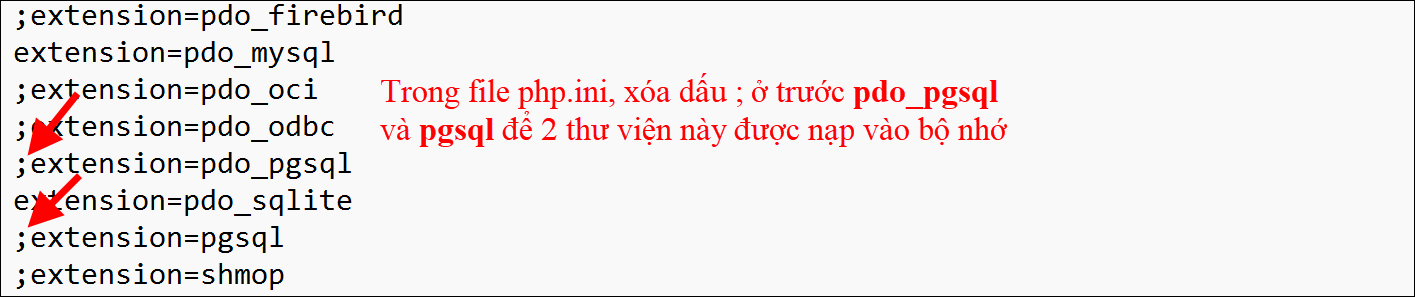
- Stop và start lại Apache để 2 thư viện được nạp vào
- Trong folder htdocs (là folder gốc của webserver Apache), hãy tạo folder postgresql-php (hoặc tên gì cũng được)
- Trong folder mới vừa tạo, tạo mới 1 file vd1.php và code:
<?php
$connect_str = “host=localhost port=5432 dbname=aa user=postgres password=123 options=’–client_encoding=UTF8′”;
$db = pg_connect($connect_str);
?>
<?php
$sql =“SELECT * FROM nha_sx”;
$data = pg_query($db, $sql);
if (!$data) { echo “An error occurred.\n”;exit;}
?>
<?php while ($row = pg_fetch_assoc($data)) {?>
<p> <?php echo $row[‘ten’]?> </p>
<?php } ?>
- Test thử: http://localhost/postgresql-php/vd1.php
Kết nối đến PostgreSQL từ Laravel
- Tạo project laravel
Cài composer
Chạy lệnh tạo project
composer create-project laravel/laravel postgre_laravel
Chạy project
Chạy lệnh trong folder project: php artisan serve
2. Cấu hình kết nối db
- Mở file .env và khai báo kết nối
DB_CONNECTION=pgsql
DB_HOST=127.0.0.1
DB_PORT=5432
DB_DATABASE=aa
DB_USERNAME=postgres
DB_PASSWORD=123
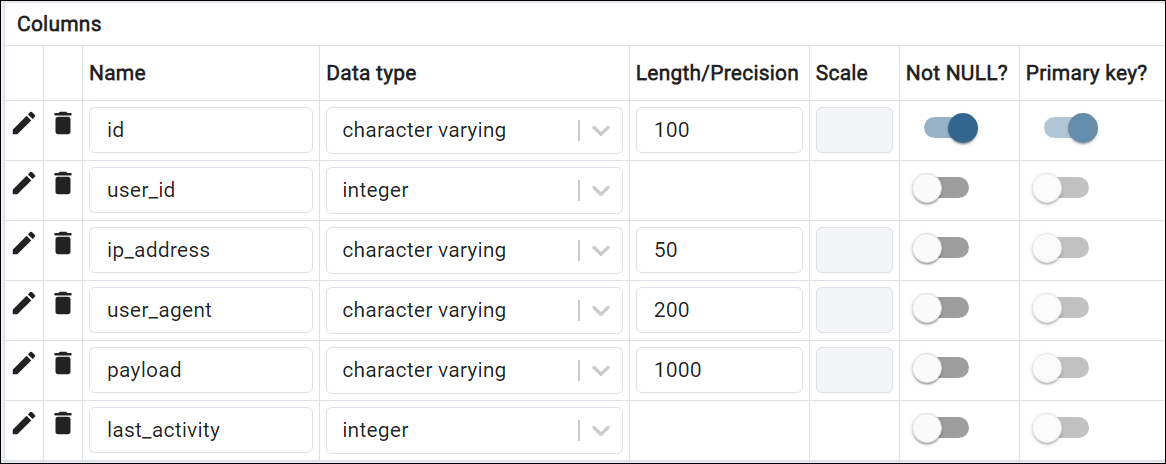
- Tạo bảng sessions để Laravel dùng
3. Định nghĩa route lấy dữ liệu trong routes/web.php
Route::get(‘/nhasx’, function () {
$query = \DB::table(“nha_sx”);
$kq = $query->get();
return view(‘nhasx’, [‘nhasx’=> $kq]);
});
Tạo view
<h1>Danh sách nhà sản xuất</h1>
@foreach($nhasx as $nsx)
<p>{{ $nsx->ten}}</p>
@endforeach
Kết nối đến PostgreSQL từ NodeJS
1. Tạo project NodeJS
- Tạo folder postgre_nodejs
- Cài module: Chuyển vào folder gõ lệnh
npm i express
npm i ejs
npm i pg
npm i
- Dùng Vs mở folder postgre_nodejs
- Tạo file index.js: tạo file index.js và code
const express = require(“express”);
const app = express();
app.set(“view engine”, “ejs”);
app.set(“views”, “./views”)
//Khai báo thông số kết nối postgre
// Định nghĩa route để lấy và hiện dữ liệu
app.listen(3000, ()=>`Ung dung dang chay o port 3000`)
- Khai báo thông số kết nối postgre
const { Client } = require(‘pg’);
var pg = new Client({
user: ‘postgres’,
password: ‘123’,
host: ‘localhost’,
port: ‘5432’,
database: ‘aa’,
});
- Định nghĩa route để lấy và hiện dữ liệu
app.get(“/”, async (reg, res)=> {
await pg.connect()
.catch( err => console.error(‘Lỗi kết nối đến PostgreSQL’, err))
.then(() => console.log(‘Connected to PostgreSQL database’))
let sql=“select id, ten from nha_sx”;
let data = await pg.query(sql);
console.log(data.rows)
res.render(“nhasx”, { nhasx_arr:data.rows })
})
- Tạo view
<h1>Danh sách nhà sản xuất</h1>
<% for( let nsx of nhasx_arr ) { %>
<p> <%=nsx.ten%> </p>
<% } %>
Chúc các bạn th
Giảng viên Nguyễn Văn Long
Bộ môn CNTT
FPT Polytechnic TP HCM